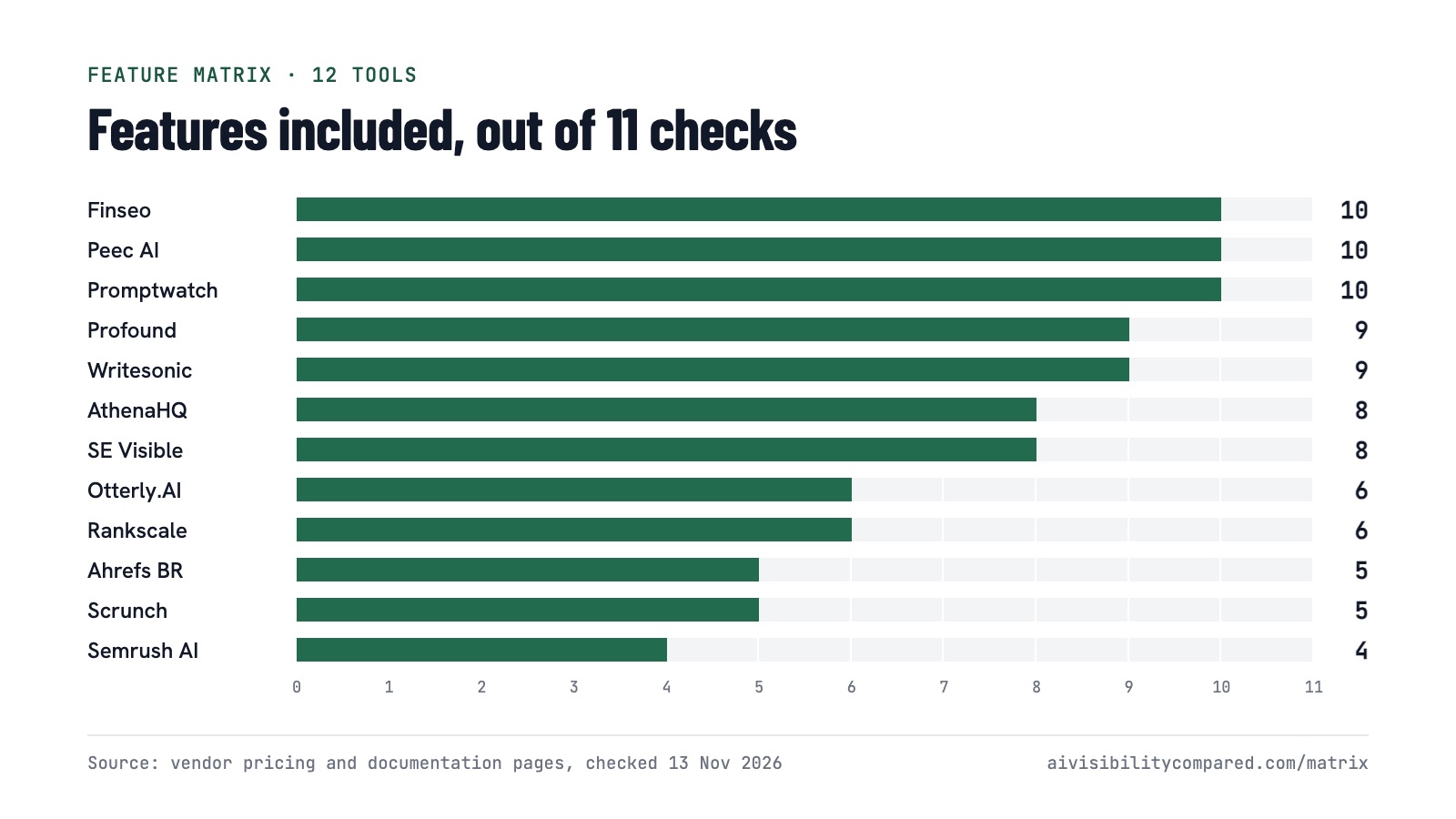
How do we check every cell in the matrix?
The matrix only works if anyone can check it. Here is what each column means, what each symbol means, and where the values come from.
What sources do we use?
- Vendor pages first. Pricing, plan limits and features come from each vendor's own pricing, product and documentation pages. The pages used for each row are listed under the matrix.
- Independent sources second. Studies, analyst write-ups and reputable reviews add context in the long-form reports and are cited with numbered sources.
- Dated checks. The matrix shows the date of the last check (currently 13 Nov 2026). When sources disagree, we follow the vendor's page and say so.
What do the symbols mean?
| Symbol | State | When we use it |
|---|---|---|
| ● | Included | Published as part of the product; the note names a plan when the vendor sells only one paid package. |
| ◐ | Higher tier or add-on | Available, but not on the entry plan in the price column; the note names the tier or add-on. |
| ◇ | Separate product | Offered by the same vendor as a different product with its own pricing. |
| ○ | Not on entry plan / not covered | The vendor publishes a limit that excludes it on the entry plan. |
| – | Not published | We could not find it on the vendor's public pages. It may exist on request. |
What does each column measure?
| Column | Group | Definition |
|---|---|---|
| Citations & sources | Measure | The tool records which URLs and domains an AI answer cites, not only whether the brand is named. |
| Sentiment | Measure | The tool classifies how a brand is described in answers (positive, neutral, negative or similar). |
| Competitor benchmark | Measure | The tool tracks competing brands on the same prompts and reports share of voice or rank against them. |
| Prompt research | Measure | The tool helps find which prompts to track — prompt suggestions, demand estimates or fan-out analysis. |
| Content optimization | Act | The tool turns findings into content or page changes: recommendations, audits, optimization scores or an agent. |
| AI crawler analytics | Act | The tool shows AI crawler or agent visits to your site from CDN or server logs. |
| GA4 connection | Connect | The tool connects to Google Analytics 4 to relate AI visibility to traffic. |
| API | Connect | A documented API for pulling data out of the tool. |
| MCP server | Connect | An MCP server that lets AI assistants query the tool's data. |
| Looker Studio | Connect | A Looker Studio (Data Studio) connector. |
| Unlimited seats | Team | The vendor publishes unlimited users on the plan in the price column. |
What do we not do?
- We do not publish star ratings, weighted scores or anonymous reviews.
- We do not test answer accuracy inside the matrix; long-form reports discuss data collection methods instead.
- We do not accept payment from vendors for placement.
How is Finseo handled?
Compared. is run by the team behind Finseo. Finseo is listed first and checked against the same definitions as every other tool, and the disclosure sits directly at its entry.
How often is the matrix updated?
Prices and engine coverage change often in this category. We re-check every row at least monthly and whenever a vendor announces a pricing change. Corrections go to editorial@aivisibilitycompared.com.